
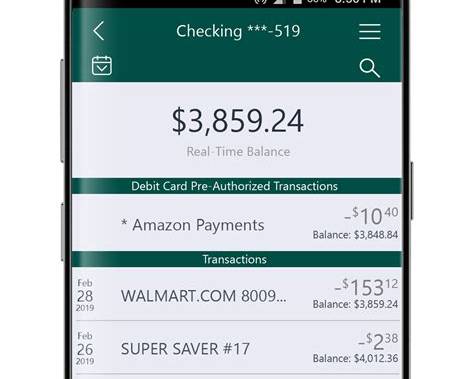
A transaction list can tell you that $60 left an account on Monday, $1,800 arrived on Tuesday and another $125 was spent on Wednesday. What it does not always show is the most obvious consequence of each event: how much money remained immediately afterward.
Some banking apps and account statements solve this by displaying a running balance alongside individual transactions. Instead of presenting deposits and withdrawals as isolated entries, the interface shows how each one changed the account. It is a small addition to transaction history, but it can make financial activity considerably easier to reconstruct.
A Transaction Amount Only Shows Half of the Change
Most transaction histories emphasize the amount that moved. Incoming money may appear with a plus sign, while purchases, transfers and withdrawals are displayed as negative amounts. That tells users what happened to an individual transaction, but understanding the account itself requires another calculation.
Imagine this short history:
| Transaction | Amount | Balance after transaction |
|---|---|---|
| Opening balance | — | $1,250 |
| Grocery store | -$85 | $1,165 |
| Salary | +$2,000 | $3,165 |
| Rent | -$1,100 | $2,065 |
| Electricity bill | -$140 | $1,925 |
Without the final column, a user who wants to know how much money was available after the rent payment has to reconstruct the sequence manually. With a running balance, the answer is already attached to the relevant transaction. This becomes more useful as transaction history grows longer.
Running Balances Create a Financial Sequence
A conventional transaction feed can feel like a collection of separate events. A running balance turns those events into a sequence. The distinction is subtle but important. If an account currently contains $780, the user may want to understand how it reached that figure. Looking at individual purchases provides some information, but seeing the balance after each one creates a visible path from an earlier amount to the current total.
That makes the history easier to read in both directions. Users can move forward from an earlier balance to see how spending reduced it, or move backward from the current balance to identify when a larger change occurred. In effect, every transaction becomes a checkpoint.
It Can Help Users Find the Moment a Balance Changed
People do not always investigate their accounts immediately after something happens. A user may notice near the end of the month that the available amount is lower than expected and then look back through several weeks of activity.
Without running balances, the process can involve mental arithmetic. The user needs to add deposits back, subtract withdrawals and account for multiple transactions until the earlier position is reconstructed.
Showing a balance after each completed transaction makes the search more direct. A user can scan the history and identify that the account had $1,420 after one transaction but $760 after another. The large difference immediately narrows the period that deserves closer inspection. The feature does not explain whether the spending was appropriate. It simply makes the numerical history easier to follow.
The Order of Transactions Suddenly Matters More
Running balances also highlight something that ordinary transaction lists can obscure: transaction order. Suppose several payments occur on the same day. If a salary payment, direct debit and card purchase all appear together, their order affects the intermediate balance even if the final result is identical.
A useful interface therefore needs to present the sequence consistently. Timestamps can help when they are available, although not every payment system provides identical timing information. Card authorizations, completed card payments, bank transfers and scheduled debits can also move through different processing stages. This means a running balance works best when the app makes clear which transactions are actually included in the calculation.
Pending Transactions Complicate the Picture
The concept becomes more difficult when pending card payments enter the transaction history. A completed payment has a relatively clear relationship with an account balance. A pending authorization may temporarily reduce the money available to spend without yet appearing as a finalized transaction. Hotels, fuel stations and some other merchants can also create temporary authorization amounts that later change. If an app displays a running balance without explaining how pending activity is treated, users may see numbers that appear inconsistent.
For example, an account could show:
Current balance: $1,200
Pending payments: $150
Available to spend: $1,050
A running balance attached only to completed transactions might still end at $1,200. That is not necessarily an error. It reflects the difference between posted transactions and funds temporarily unavailable because of pending activity. The interface needs to make that distinction visible.
Current Balance and Available Balance Are Not Always the Same
This leads to another important issue. “Balance” can refer to different figures depending on the account and banking system. A current or ledger balance may represent completed transactions. An available balance can also account for pending authorizations, holds and other restrictions affecting what the customer can actually spend.
If a banking app places a number beside every transaction, users need to understand which balance that number represents. Simply writing $925 balance can create ambiguity. A label such as Balance after transaction is more informative, while additional explanations may be necessary when available funds differ because of pending activity. Good financial interfaces do not merely display precise numbers. They make clear what those numbers measure.
Running Balances Can Make Older Transactions Easier to Understand
The feature becomes particularly useful when reviewing historical activity. Suppose a user wants to know how much money remained in an account immediately before a large purchase three months ago. The current balance cannot answer that question, and looking at the purchase amount alone provides no indication of the financial position at the time.
A historical running balance can. This can help when reviewing previous spending periods, checking whether enough funds were available around a particular date or simply reconstructing an older sequence of deposits and withdrawals.
It effectively gives each completed transaction a small snapshot of the account at that point in time. That is different from a spending chart, which aggregates activity into categories or periods. A running balance remains tied to individual transactions.
Search Becomes More Useful When Balance Context Remains Visible
Modern banking apps increasingly allow users to search transaction history by merchant, date, amount or category. Running balances can add another layer of context to those search results. Imagine searching for an old rent payment. Finding the transaction tells the user how much was paid and when. Showing the balance immediately afterward also answers how much remained once the payment had been processed.
This is especially helpful when users are investigating a specific event rather than reviewing an entire month. The important design challenge is maintaining context. If a search result shows a transaction removed from the surrounding sequence, the app should make clear that the displayed balance belongs to that historical point rather than representing today’s account balance. A small label can prevent a surprisingly large misunderstanding.
More Numbers Can Also Create More Clutter
There is a reason not every mobile banking interface places running balances directly in the main transaction feed. Phone screens have limited space. A typical transaction already needs to communicate the merchant or recipient, amount, date, category and status. Adding another financial figure to every row can make the list harder to scan.
The solution does not necessarily require removing the feature entirely. Some apps can show running balances only in expanded transaction details, statement views or dedicated account-history screens. Others may use lighter typography so the transaction amount remains visually dominant while the balance is available as secondary information. The right design depends on what users need most frequently.
Corrections Need to Preserve a Understandable History
Transaction histories are not always permanent from the moment an event first appears. Payments can be reversed, refunds can arrive and card authorizations may disappear or change before final settlement. Running balances need to respond correctly to these changes.
If a $50 transaction is reversed, the history should make it possible to understand both the original event and the return of the funds. Simply altering an old balance without showing why it changed could make the historical record harder to interpret.
This is one reason financial timelines benefit from explicit statuses. Completed, reversed, refunded and pending events should not look identical when they have different effects on the account. The running balance is useful only when users can trust the sequence behind it.
Statements and Mobile Apps Solve Different Problems
Running balances have long been familiar in traditional account statements. A statement is naturally chronological and designed for reviewing financial history over a defined period. Mobile banking has different constraints. Users often open an app for a few seconds to check a current balance or inspect one transaction. A dense statement-style table may therefore be inappropriate for the main screen.
However, the underlying information can still be valuable. A modern banking app can provide a simplified transaction feed for everyday use while allowing users to access running balances when they need deeper historical context. This preserves the speed of mobile banking without removing useful account information. The feature does not have to dominate the interface to be useful.
Small Contextual Details Can Make Banking Easier to Understand
Digital banking products often compete through major features: budgeting systems, financial forecasts, automated insights and increasingly sophisticated personalization. Yet many everyday improvements come from much smaller pieces of context. A balance after each transaction is one of them.
It does not predict future spending or tell users how to manage their money. Instead, it answers a straightforward historical question: how much was in the account after this happened? When that information is presented consistently and clearly distinguishes completed activity from pending funds, transaction history becomes easier to reconstruct. Users no longer see only a collection of money movements. They can see how those movements changed the account one step at a time.
